Search for a way to speed up address entry at a WooCommerce checkout and almost every result says "address autocomplete". It is a reasonable thing to want: fewer keystrokes, fewer typos, fewer abandoned baskets at the address step. But for a UK store there are two different tools hiding behind that phrase, and they behave differently enough that it is worth choosing deliberately.
Autocomplete and postcode lookup are not the same thing
Address autocomplete
The shopper starts typing the first line of their address and a drop-down suggests complete addresses as they go. It is the pattern from maps apps, and most autocomplete plugins use map data behind the scenes. It works anywhere in the world, which is its great strength if you ship internationally.
Postcode lookup
The shopper types their postcode and picks their address from the list at that postcode. It only works where postcodes are precise enough to narrow things down to a handful of addresses, which in the UK they are: a full postcode typically covers one street or one large building.
Why UK shoppers expect postcode first
- It is what they are used to. Banks, utilities, insurers and the big retailers all ask for a postcode first. Typing a first line and watching suggestions appear feels foreign by comparison.
- The postcode is the part people know. Everyone can type their postcode from memory and get it right. First lines vary: "Flat 3", "3/2", "Top floor flat, 12", "12A".
- Deliverable addresses, not map points. Map data is good at streets and poor at what is inside a building. Flats, units on an industrial estate and new-build developments are where autocomplete most often returns nothing or something wrong, and where a courier most needs the detail.
- Formatting comes out right. A lookup returns line 1, line 2, town and county as separate values, already in the form a label needs. Autocomplete returns one string the plugin then has to split, and the split is where "Leeds" ends up in the county box.
If most of your orders ship within the UK, postcode lookup is the better fit. If you ship worldwide, you may want both: lookup for United Kingdom and autocomplete, or plain typing, for everyone else.
Which WooCommerce checkout do you have?
This matters because the two checkouts are built differently and need different plugins.
- Checkout block. The default for stores created since WooCommerce 8.3. Open your checkout page in the block editor and you will see a Checkout block with its own settings.
- Classic (shortcode) checkout. Older stores, and anyone who switched back. The checkout page contains
[woocommerce_checkout].
BePostcodes has a plugin for each, both included in every plan, so you can move from one to the other without changing your subscription.
Adding postcode lookup to the Checkout block
- Install the plugin from your BePostcodes dashboard and activate it.
- Go to WooCommerce › Settings › BePostcodes, paste your API key, leave Enable lookup ticked and save.
- That is the setup. There is nothing to map: the plugin finds the address inputs in the Checkout block itself, for billing and shipping.
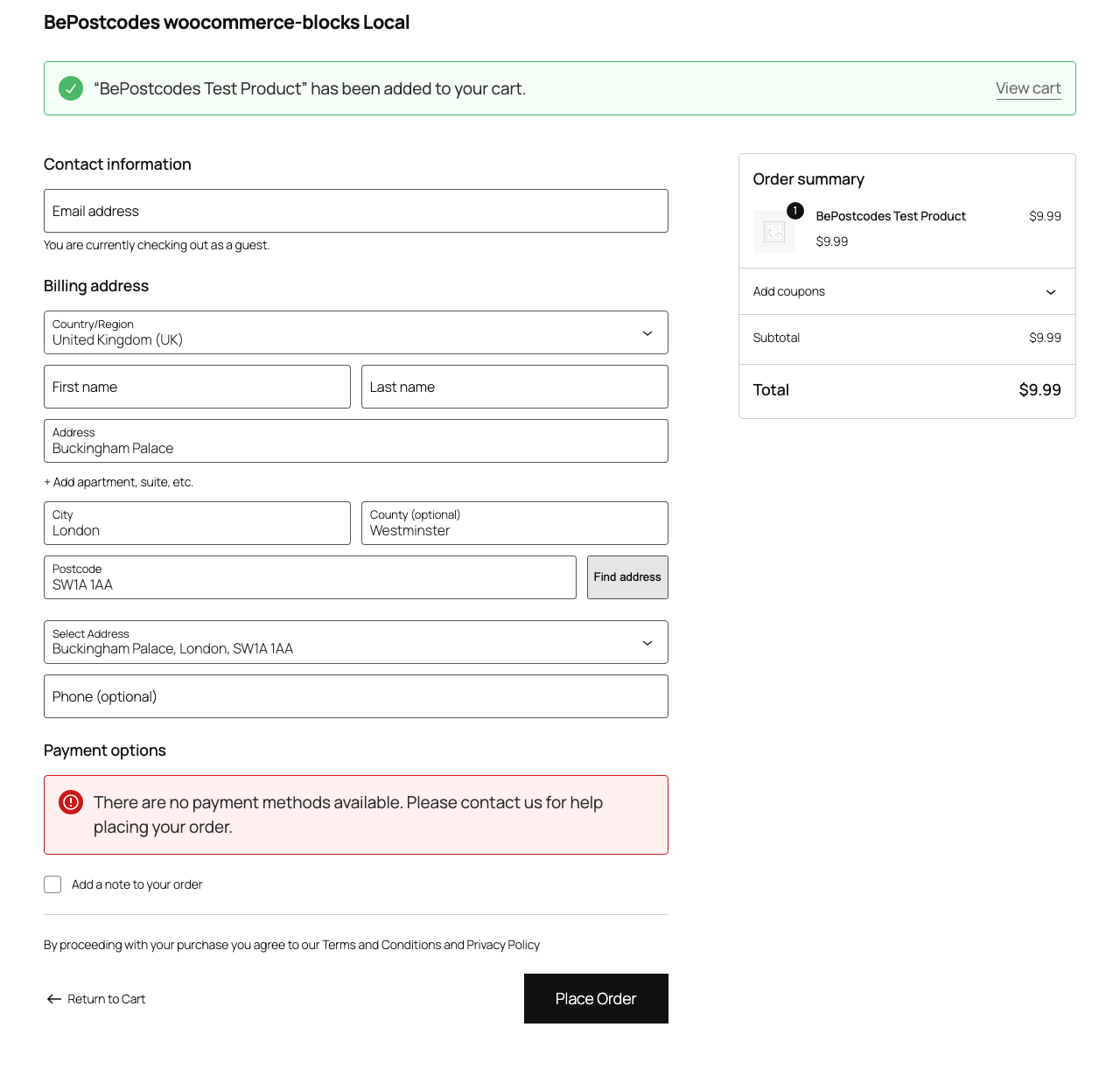
Two things to know. The button only shows when the country is United Kingdom, so international shoppers see the normal checkout. And the plugin fires the same change events WooCommerce listens for, so shipping options recalculate as if the shopper had typed the address. The setup guide has the full walkthrough and the troubleshooting list; the classic checkout guide covers the shortcode version, which also adds lookup to My Account addresses and the admin order editor.
Checking it made a difference
Do not take anyone's word for the effect on conversion, including ours. WooCommerce Analytics shows orders and, with a tracking tool, checkout funnel steps. Note the proportion of checkouts started that complete in the fortnight before you switch lookup on and the fortnight after, and look at your returned-delivery and "wrong address" support tickets over a longer window. Those are the numbers that matter for your store.
If you want to try it, plans start at £6 a month for 300 lookups, and a lookup is only used when a shopper searches a postcode, not when they pick from the list.